»அனைவருக்கும் வணக்கம்.................|||||||.......,IT துறையில் வெளியாகும் மிக முக்கிய Software மற்றும் demand in world market சம்பந்தமான தகவல்களை என்னால் முடிந்த பங்கினை இன்றைய இளைய சமுதாய மாணவர்களுக்கு எழுத்து மூலமாக அறியத்தருகின்றேன்..

Tuesday, March 13, 2012

Oracle Apex Interactive Reports

இவ்வகையான IR  ரிப்போர்டுகளை உருவாக்கியபின்பு சில நேரம் நமக்கு ஒரு குறிப்பிட்ட Column-த்தில்  DDL  செய்ய நேரிடலாம் அப்போது அந்த DDL செய்யப்பட்ட column  ரிப்போர்டில் வராது.அந்த நேரம் செய்யவேண்டியது.

Tabular Form in Apex

இந்த form  அமைக்கும் போது row  ID யை primary key யாக கொடுக்க வேண்டாம்.ஏன்னா DML செய்யும் போது பல பிரச்சனை வருது.அதே நேரம் paassing  பாராமீட்டர் கண்டிப்பா ஒன்னு empty  யாக இருக்கணும் அது #  field-க இருக்கணும்.


Oracle Application Express(APEX)

இந்த தனிப்பட்ட Software ஒருவிதமான தனித்தன்மையை கொண்டுள்ளது.அது என்னென்ன என்றால்?

  • வெறும் Database மட்டுமே போதும்  appilcation  சர்வர் தேவையில்லை 
  • படுவேகமா வேலை செய்யும் காரணம் PLSQL எஞ்சின்  
  • சிறந்த வெப் முறையில் Debugging மற்றும்  பயன்பாடு. 
  • பலவிதமான reports  Buildin  
  • ரிப்போர்டுகளை export (PDF , Excel) செய்யும் வசதி 
  • Cloud computing இணைந்தது 
  • பலவிதமான Plug-In வசதி உள்ளது 
  • Data Back மிக மிக எளிது like  Copy&பேஸ்ட்
  • Excel  பயனீட்டாளர்கள் உடனே வெப் application-க்கு வாங்க...மிக மிக சுலபம்!
Apex working diagram

Thursday, October 13, 2011

What is Oracle ADF? How can understand from the scratch!

Please through this link for complete guide for Oracle ADF tour....
Oracle Application Development Framework(ADF)

Wednesday, October 12, 2011

New Futures in Oracle ADF

புத்தம் புதிய கவர்ச்சியான ஒரு PageView தந்திருக்கிறது நம்ப ஆரக்கிள் அதுதான்...

Oracle ADF Carousel Hierarchy View! இது என்னெல்லாம் செய்யுதுன்னா? 
பழைய Hierarchyஎன்பது வெறுமனே list  மட்டுமே FlowChart முறையில் காண்பிக்கும்.
இப்போ வந்துள்ள இந்த Carousel Hierarchy முறை சற்று வித்தியாசமா இருக்கு கொஞ்சம் வாங்க பார்க்கலாம்!

நாம விரும்பும் ViewObject க்களை ஒன்றன்பின் ஒன்றாக animation  உடன்   கலக்கலாக தருகிறது ADF.அதற்க்கான உதாரண படம் கீழே வாங்க..

                                          இதுதான் carousel என்ற புதிய technology

விரைவில் இதற்கான முழு விபரங்களையும் இதை எப்படி உருவாக்குவது என்பது பற்றியும் பார்க்கலாம்...அதுவரை உங்களை "விடாது கருப்பு!"

Wednesday, April 6, 2011

ஆரக்கிள் Table நுணுக்க துளிகள் !

ஒவ்வொன்றுக்கும்  எ-கா-உடன் விளக்கம் தரப்படும்.... 

Oracle Basic Information for Beginners…..

What are the difference between DDL, DML and DCL commands?

DDL - Data Definition Language: statements used to define the database structure or schema. Some examples:
§                     CREATE - to create objects in the database
§                     ALTER - alters the structure of the database
§                     DROP - delete objects from the database
§                     TRUNCATE - remove all records from a table, including all spaces allocated for the records are removed
§                     COMMENT - add comments to the data dictionary
§                     RENAME - rename an object
DML - Data Manipulation Language: statements used for managing data within schema objects. Some examples:
§                     SELECT - retrieve data from the a database
§                     INSERT - insert data into a table
§                     UPDATE - updates existing data within a table
§                     DELETE - deletes all records from a table, the space for the records remain
§                     MERGE - UPSERT operation (insert or update)
§                     CALL - call a PL/SQL or Java subprogram
§                     EXPLAIN PLAN - explain access path to the data
§                     LOCK TABLE - controls concurrency
DCL - Data Control Language. Some examples:
§                     GRANT - gives user's access privileges to database
§                     REVOKE - withdraw access privileges given with the GRANT command
TCL - Transaction Control: statements used to manage the changes made by DML statements. It allows statements to be grouped together into logical transactions.
§                     COMMIT - save work done
§                     SAVEPOINT - identify a point in a transaction to which you can later roll back
§                     ROLLBACK - undo the modification I made since the last COMMIT
§                     SET TRANSACTION - Change transaction options like isolation level and what rollback segment to use
§                     SET ROLE - set the current active roles
DML are not auto-commit. i.e. you can roll-back the operations, but DDL are auto-commit

What is Table?

What are the stuff in table?

How to defined the relationship between the table?

aware the stuff in before the table creation !

aware the caution of steps after the table creation!


பெரும்பாலான நேரங்களில் Table உருவாக்கும் போது சில நுணுக்கங்களை கவனிக்காமல் விட்டு விடுவது வழக்கம்தான்...அதுபோன்ற நேரங்களில் என்னென்ன செய்யலாம் அதற்கான வழிகள் என்னென?

Once Created Table like this...

CREATE TABLE department (
department_id NUMBER(5),
division_id NUMBER(5),
department_name VARCHAR2(40),
address_id NUMBER(10));

The Table will be get default SEQUENCE with cache 20;


Table உருவாக்கம் செய்த பிறகு SEQUENCE அதன் ID யை தானாகவே 20,20என்று(1,21 ,40 ,61 ,81) கூடிக்கொண்டே போகும்!அதன் பின்னணியில்

CREATE SEQUENCE Seq_name START WITH 1
MAXVALUE 99 cache 20;

என்று நாம் அமைத்திருக்கலாம்...ஆனால் இப்போது நமக்கு அப்படியொரு SEQ_ID INCREMENT தேவையில்லை சோ நாம் அதை நீக்கவேண்டிய கட்டத்தில் உள்ளோம்.
அப்படியானால் இப்படி யொரு கதையை செய்வோம்..

லாஜிக்:ALTER SEQUENCE CACHE | NOCACHE

கோடு:ALTER SEQUENCE Seq_name NOCACHE;

குறிப்பு : Seq name -யை சரிபார்க்கணும்.

Tuesday, March 1, 2011

Oracle Application Development Framework(ADF)


Full Video Demo.....

Oracle ADF Related Tutorial....

Requirement of ADF Development Environment...

Operations System : Windows XP Pro / Windows 2003 Server R2 Edition.

Database :oracle 10 g or 11g Em edition.

Development Environment : Oracle Jdeveloper (Studio Edition Version 11.1.1.1.0) or above..

Generating Tool : Oracle JHeadStart 11G

Table access : Toad for Oracle DBA/Dev Tool

Browser : should configure properly within Jdeveloper...like the following...


Through this slide show for the complete guide in Oracle ADF App Creation...

External Source.....
====================================
Each changes in Jheadstart then you should have to run the Jheadstart tool..
====================================

Some time running the web page might be displaying with Question marked label...
If you are facing like this...


Then you have to change the label source switching DB Table... like the following...


Now you can see the fine pages...


இங்கு பலவிதமான பிரச்சனைகள் உடன் Error வரும்! அவைகளை எவ்வாறு கையாள்வது என்பது குறித்து விபரமாக பார்க்கலாம்...

If the weblogic server is not starting with the following error..


Login in Weblogic server(WebLogic Server Version: 10.3.1.0 @ 11g) with username: weblogic and password: weblogic1


If some services has conflicting..then you have do restart services...


If the error you are facing the following screen...and log massage as...


Log File:      C:\Documents and Settings\aramani\Application Data\JDeveloper\system11.1.1.3.37.56.60\o.j2ee.adrs\ExtendDefaultDomain.log
Label:         JDEVADF_11.1.1.3.PS2_GENERIC_100408.2356.5660
Product Home:  C:\Oracle\Middleware3\jdeveloper\jdev\
Domain:        C:\Documents and Settings\aramani\Application Data\JDeveloper\system11.1.1.3.37.56.60\DefaultDomain

"C:\Oracle\Middleware3\oracle_common\common\bin\wlst.cmd" "C:\Documents and Settings\aramani\Application Data\JDeveloper\system11.1.1.3.37.56.60\o.j2ee.adrs\ExtendDefaultDomain.py"
Process started
wlst >
wlst > CLASSPATH=C:\Oracle\MIDDLE~2\patch_wls1033\profiles\default\sys_manifest_classpath\weblogic_patch.jar;C:\Oracle\MIDDLE~2\patch_jdev1111\profiles\default\sys_manifest_classpath\weblogic_patch.jar;C:\Oracle\MIDDLE~2\JDK160~1\lib\tools.jar;C:\Oracle\MIDDLE~2\WLSERV~1.3\server\lib\weblogic_sp.jar;C:\Oracle\MIDDLE~2\WLSERV~1.3\server\lib\weblogic.jar;C:\Oracle\MIDDLE~2\modules\features\weblogic.server.modules_10.3.3.0.jar;C:\Oracle\MIDDLE~2\WLSERV~1.3\server\lib\webservices.jar;C:\Oracl.............................................many ...lines
wlst > com.oracle.cie.domain.script.jython.WLSTException: com.oracle.cie.domain.script.jython.WLSTException: com.oracle.cie.domain.script.ScriptException: com.oracle.cie.domain.template.dependency.TemplateDependencyException: Template is already installed.
wlst >
Elapsed time:  21436 ms


Then what we should do...the following steps...
மற்றொருவகையில் Error  வர வாய்ப்பு உள்ளது....


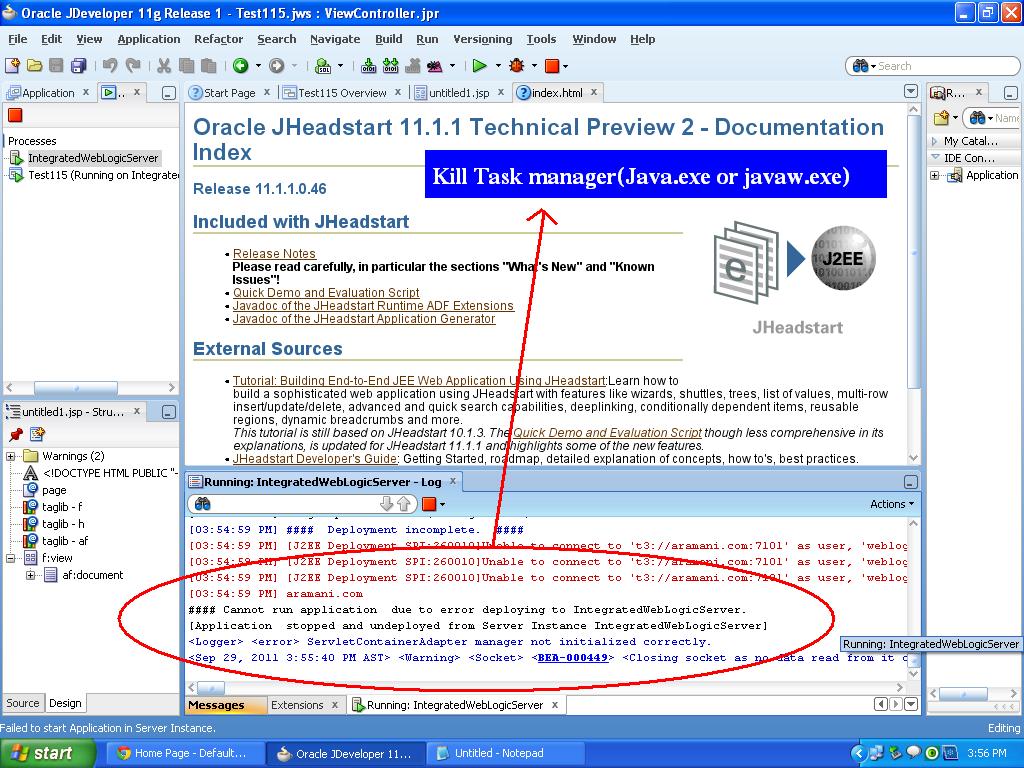
TaskManager-ல் java.exe என்ற service run ஆனா நிலையில் இருக்கும்...சோ அதனை கொல்லனும்....அப்புறம் திரும்ப வந்து Application ஐ restart பண்ணினா work ஆகும்.
file Example: D:\JDeveloper\My work 11.4\ViewController\src
------------------------------------------------------------
     #### Cannot run application (Your App name) due to error deploying to IntegratedWebLogicServer!

error massage....
----------------

#### Cannot run application CompositeVOSample due to error deploying to IntegratedWebLogicServer.
[12:02:20 PM] ####  Deployment incomplete.  ####
[12:02:20 PM] Remote deployment failed (oracle.jdevimpl.deploy.common.Jsr88RemoteDeployer)
[Application CompositeVOSample stopped and undeployed from Server Instance IntegratedWebLogicServer]
-------------------

இதுபோல error வந்தால்...நிச்சயம் அந்த Application ல் பிரச்சனை உள்ளது சோ  அதை முதலில் சரி செய்ய பாருங்கள்...அல்லது உங்களது Weblogic சர்வர் work ஆகுதா இல்லையா என்பதை Console மூலம் உறுதி செய்யுங்கள்...அல்லது ஒரு  புதிய வெத்து JSF File-ஐ உருவாக்கி ரன் செய்து பாருங்கள்....அந்த வெத்து JSF file work ஆகுது என்றால்...உங்க   weblogic சர்வர் பக்கா.

 
All Right Reserved by Vadakadu Thorn Group of IT ©2011